
• About Us
  • Contact
  • News
  • 859-225-6400
Search Search
Medmovie.com
  • Custom Animation
    • Custom Animation
    • Pharma + Biotech
      • Pharma + Biotech
      • Case Study – Specialty Pharma
    • Med Device
      • Med Device
      • Case Study – Cook Medical
    • Our Process
    • Testimonials
  • Hx Heart App
    • Hx Heart App
    • Hx Heart Video Library (HVL) Overview
    • View Hx Heart Video Library (HVL)
    • Request Quote or More Info About HVL
    • Medmovie Hx 3D Heart
    • News, Clients, and Testimonials
  • AR/VR
    • AR/VR
    • Hx VR – Meta App
    • Hx 3D Models
  • Medlegal
    • Medlegal
    • Case Study – Medlegal
    • Our Process
    • 3D Reconstructions
    • Testimonials
    • Frequently Asked Questions
    • Request Estimate or Information
  • Stock
  • Click to open the search input field Click to open the search input field Search
  • Menu Menu

Accessing and Using Your HVL (Hx Video Library)

See also: How to Embed Your HVL

Step 1: Log In

Use this link to login: https://medmovie.com/wp-login.php and enter the username and password that has been given to you.

If you don’t know your username or password, please email us at mail@medmovie.com

Step 2: View Profile Page

Once logged in, your profile should look similar to what’s shown here.

To access your complete library or libraries, scroll to the bottom of the page and click the Subscriber Libraries link.

Step 3: Access Subscriber Library

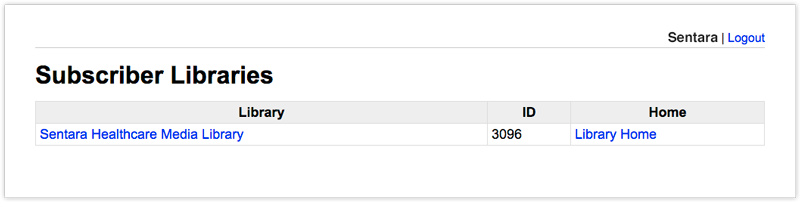
You will then be taken to this screen, which lists your library or libraries.

Choose the left link (In this example, Sentara Healthcare Media Library) to access your list of topics.

Choosing Library Home on the right takes you to your standalone public facing CVL.
1
2
1

When logged into your own subscriber library, this left link will bring your to your list of topics.

2

Clicking on Library Home will load your live library homepage in it’s own window.

Step 4: Use Your Subscriber Topics

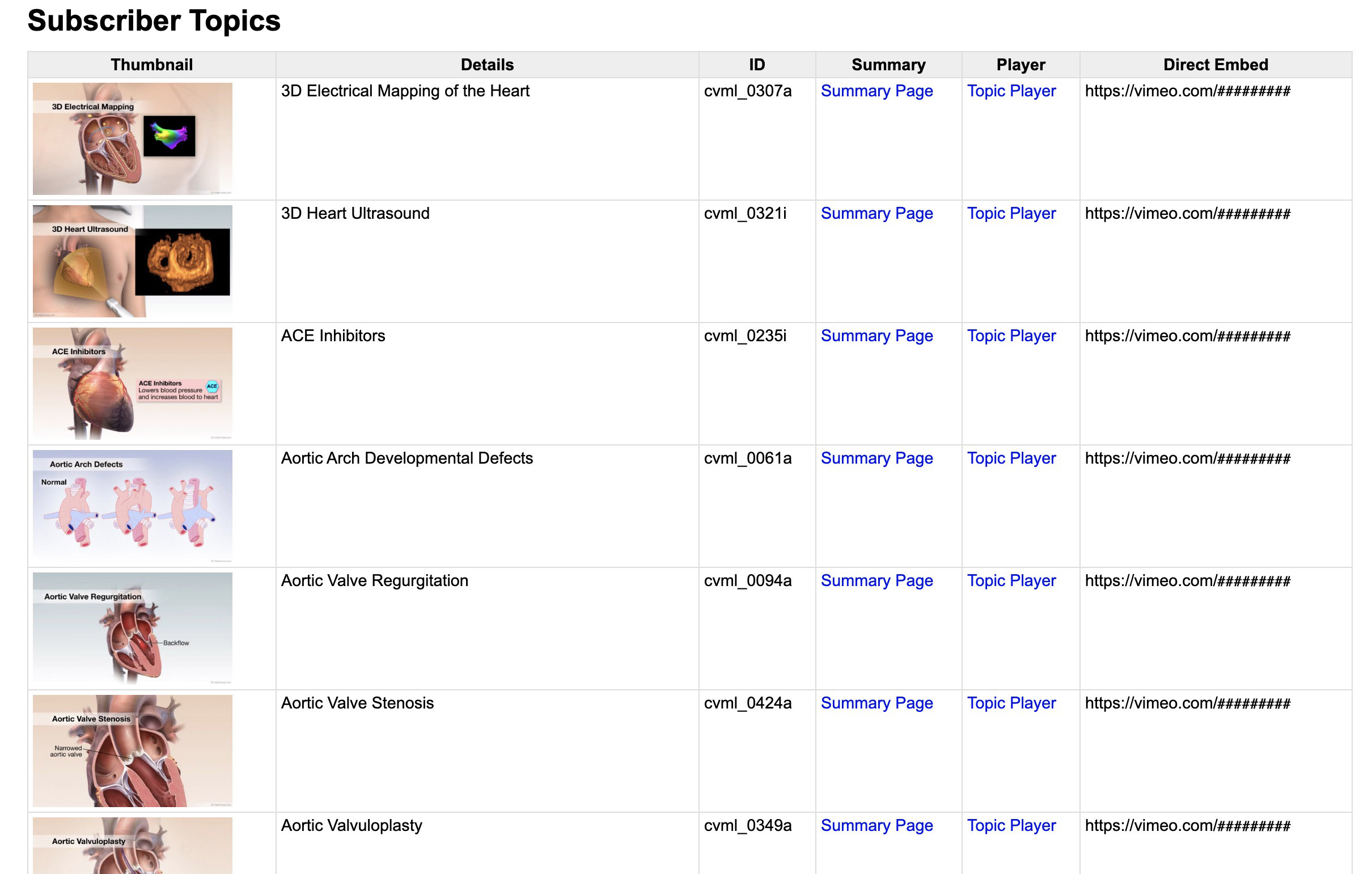
Your Subscriber Topics will allow you to save the thumbnails and copy links to the videos and Summary Pages for each topic.
1
2
3
4
1

Thumbnails are small animation preview images you can save to use as direct links to videos within your own website.

2

The link to printable summary pages with both text and images for each of your topics.

3

Medmovie-hosted direct links to each of your subscribed videos.

4

Vimeo-based direct links to each of your subscribed videos. You may or may not have this feature enabled. Please reach out with questions.

1. Thumbnails: You may choose to use these thumbnails within your site and and link them to videos. To save a thumbnail, simply right-click (ctrl-click on Mac) the thumbnail and choose “Save Image As”. Then you can choose a place on your computer to save the image to.You can also drag-and-drop the thumbnail from the browser to your desktop.

2. Summary Page Link: This column contains links to each topic’s summary page with both text and images. You can click that link to go to the summary page, or right-click (ctrl-click on Mac) it to copy the link. You may also choose to print these summary pages as patient handouts.

3. Player (Medmovie-hosted Video Link): The Medmovie-hosted link to each topic’s video is located under the column named “Player”. You can click that link to watch the video, or right-click (ctrl-click on Mac) it to copy the link to edit and embed the video in your own website.

4. Direct Embed (Vimeo-based Video Link): The Vimeo-based link to each topic’s video is located under the “Direct Embed” column. If you don’t have this feature enabled but would like to, reach out to us.

Read about embedding your videos.

See also: How to Embed Your HVL

“The Cardiovascular Media Library is a wonderful patient education tool that visualizes important topics and makes them understandable to patients.”

Mehmet Oz, MD, FACSDirector, Cardiovascular Institute, Columbia University Department of Surgery

“I have worked with [Medmovie] for a number years. Our organization has utilized their wonderful illustrations and animations in their Media Library to enrich the web experience to our customers. He has consistently produced outstanding, quality work that is well-respected by our organization.”

Allison PuckettWeb Project Manager, Online Health Content, American Heart Association National Center
Previous Previous Previous Next Next Next
  • Custom Animation
    • Custom Animation
    • Pharma + Biotech
      • Pharma + Biotech
      • Case Study – Specialty Pharma
    • Med Device
      • Med Device
      • Case Study – Cook Medical
    • Our Process
    • Testimonials
  • Hx Heart App
    • Hx Heart App
    • Hx Heart Video Library (HVL) Overview
    • View Hx Heart Video Library (HVL)
    • Request Quote or More Info About HVL
    • Medmovie Hx 3D Heart
    • News, Clients, and Testimonials
  • AR/VR
    • AR/VR
    • Hx VR – Meta App
    • Hx 3D Models
  • Medlegal
    • Medlegal
    • Case Study – Medlegal
    • Our Process
    • 3D Reconstructions
    • Testimonials
    • Frequently Asked Questions
    • Request Estimate or Information
  • Stock

CONTACT US


Medmovie Inc
110 W Vine St.
3rd Floor
Lexington, KY 40507
(859) 225-6400
mail@medmovie.com

Richard Gersony, CEO
rick@medmovie.com

Michelle Davis
Production Manager &
Lead Medical Animator
michelle@medmovie.com
© Copyright - Medmovie.com
  • Contact
  • About Us
  • Medmovie Terms and Privacy Policy
Scroll to top Scroll to top Scroll to top